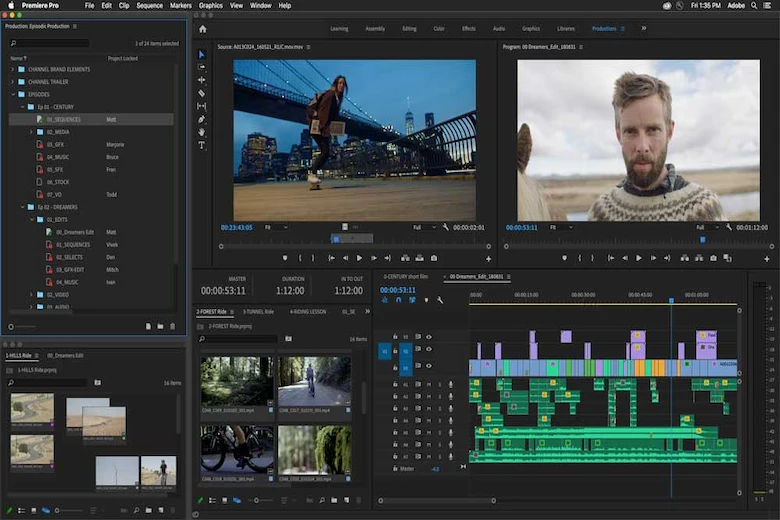
Adobe Premiere is a leading and very popular tool in the world of video editing that allows you to turn your creative ideas into attractive and moving images. This software is a key tool for anyone who works with video. From YouTubers and social media content producers to professional film and advertising production teams. With its user-friendly workspace, Premiere provides a complete set of tools to make editing, special effects and color correction as simple as possible, yet as professional as possible.
Introducing Adobe Premiere
Adobe Premiere is a powerful video editing software that allows users to express their creativity in visual formats. This advanced tool, which runs on Windows and Mac operating systems, goes beyond a simple editor and serves as a comprehensive solution for producing all kinds of video content, from commercials and social media videos to film and television works. With its intuitive user interface and extensive capabilities, Adobe Premiere has become an indispensable tool for professional and novice editors.
Adobe Premiere Applications
As a central tool in the content creation process, Adobe Premiere covers a wide range of uses, from amateur productions to high-end cinematic projects. Here are 5 uses for Adobe Premiere.
Editing feature films and documentaries
In the film industry, Adobe Premiere is considered a serious competitor to traditional systems. Its ability to handle large numbers of clips and high-quality files (such as RAW), along with precise color grading tools, makes it essential for achieving cinematic aesthetics. Professional editors use its flexibility to apply final changes to sequences and then send the output to After Effects for the final stage of special effects. In these large projects, precise coordination between visual components such as complex motion graphics and banner and poster design for trailers is possible using this ecosystem.
Social media content production and digital marketing
Adobe Premiere is an ideal tool for quickly producing this content, with fast output formats and the ability to adjust aspect ratios (such as 9:16 portrait). Editors in this field use it to create engaging teasers, short instructional videos, and A/B testing content. It allows for easy insertion of graphic elements; for example, for product-related promotional designs, using a pre-prepared graphic design for brochures and digital catalogs can speed up the work and maintain brand integrity.
Production of educational content and webinars
For instructors and online course producers, Adobe Premiere is the key to turning long recorded sessions into cohesive, engaging lessons. Tools for annotating, zooming in on important points, eliminating long pauses, and adding explanatory graphics make learning more effective. Adobe Premiere’s audio capabilities help ensure that the instructor’s voice is always clear and free of noise. Even when creating promotional materials for these courses, the software allows for the production of visual content tailored to different needs.
Editing news videos and field reports
In news environments where speed is of the essence, Adobe Premiere is invaluable for its fast ingest and rapid file organization. Reporters and news editors can quickly cut interviews, add archival footage, and prepare reports for broadcast. Additionally, on projects that require a unified visual identity, the software is used to apply standard corporate styles, whether that style is for a business card design for the production team or fixed video templates.
Creating introductory and intermediate motion graphics
Although After Effects is designed for complex animation, Adobe Premiere is also very efficient for creating simpler motion graphics, such as Lower Thirds that display a person’s name and title. Using the Essential Graphics panel, the editor can adjust these elements to match the project’s brand fonts and colors. This reinforces the consistency of visual design from main titles to written documents such as corporate office stationery.
What can't Adobe Premiere do?
As a powerful video editing software, Adobe Premiere offers a wide range of features for professional editing, but like any other specialized software, this tool has limitations and requires other complementary tools from the Adobe suite or third-party software to perform some tasks. These limitations mainly relate to areas outside the main editing process, complex 3D visual effects, and static graphics work that require more specialized tools. Here are four things that Adobe Premiere tools can’t do.
Creating complex 2D and 3D animations
Adobe Premiere is great for light motion graphics work and simple effects on video, but it is very limited when it comes to creating full-fledged computer-generated sequences, such as fluid simulations, advanced particles, or creating fully 3D environments. It lacks the powerful rendering engine needed to produce large, realistic 3D content. For such projects, editors must turn to software like After Effects (for complex, layered motion graphics) or more specialized software like Blender to accurately and accurately render 3D elements and then bring them back to Premiere for final compositing.
Precise cinematic-level color editing and correction
Although Adobe Premiere has color correction tools that are sufficient for most standard projects, for projects that require very precise cinematic-level color grading, complex custom creations, or the use of very fine-grained curve tools, the more specialized Adobe SpeedGrade software (now replaced by DaVinci Resolve in many workflows) is superior. Adobe Premiere has good tools for basic adjustments, but to achieve a consistent color palette in a feature film or projects with cinema cameras, it is often necessary to move the project into a dedicated color grading environment.
Complete production and editing of vector graphics and visual identity
Adobe Premiere can work with static graphics like banners or simple text, but it’s not suitable for creating graphic elements from scratch, such as logo design, or designing a complete brand identity for use in video. The software is video-centric and lacks the tools to work with vector formats in the way that a graphic designer would need to create a logo or detailed diagrams. These tasks are best handled by Photoshop or Illustrator, which allow for the creation, editing, and management of vector layers with the utmost precision.
Record and edit professional multi-channel audio files
Adobe Premiere has decent audio editing tools (especially with its integration with Audition) and can handle initial noise removal and overall mixing. However, for tasks like full sound design, creating complex custom sound effects, final mastering, or advanced time-sync management for projects with a large number of audio tracks (such as documentaries with multiple interviews), a digital audio workstation like Adobe Audition or Pro Tools is better suited. These specialized software programs offer a better user interface and algorithms for accurately processing frequencies and dynamics.
History of Adobe Premiere
Adobe Premiere was originally introduced as an innovative software in 1991 by Adobe and exclusively for the Mac operating system. This release was one of the first successful examples of computer-based nonlinear editing systems that revolutionized the editing process. Although the initial version had great potential, the big change came when in 2003, a rewritten version was released, officially called Adobe Premiere Pro. This extensive rewrite transformed it into the tool we know today and it was quickly adopted by the film and video industry as a leading solution, continuing its evolution with versions such as Premiere 1 to 7.
Final Words
Adobe Premiere is more than just an editing software; it is a combination of science, art, and technology that paves the way for animation students to learn and create visual works. If you are interested in producing professional works, learning and mastering the tools of this software will give you the ability to create world-class content. Premiere not only speeds up editing work, but also helps you implement your creative ideas in a visual and effective way. With constant practice and familiarity with various tools, you will become a creative editor who can create amazing animations.
At Amood Design and Branding Group, we specialize in office set design, banner and poster design, brochure and catalog design, logo design, and other processes related to digital marketing. Dear friends, you can contact us through communication bridges for more information or to receive free consultation.